
MCP, API and CLI
Run your domains from your AI assistant.
Sign in with OAuth from Claude, Codex, Cursor or any MCP client and ask in plain language. Every write is simulated first and comes back as a diff; it is applied only when you confirm, refused if the domain changed in between, and recorded in the audit log.
Run your domains from your AI assistant, and approve every change
Connect Claude, Codex, Cursor or any MCP client and ask in plain language. 44 tools read and change domains, DNS, WAF and AI-bot rules, cache, origin certificates and site settings through the same API as the dashboard, with the role you grant when you sign in with OAuth, or the permissions of an API token.
Point www.example.com at 192.0.2.10
openwaf · create_record simulation
Simulation only: nothing was applied. The domain is at version 14; applying creates version 15: 1 change:
+ www.example.com A 192.0.2.10
This adds one A record, www → 192.0.2.10, as version 15 of example.com. Shall I apply it?
Yes, apply it.
openwaf · create_record confirm · expected_version 14
Applied: the domain is now at version 15.
Simulated first
Every change runs as a dry run and comes back as a diff with the version it will create.
Applied when you confirm
The assistant shows you the plan and asks first. Applying needs an explicit confirmation.
Refused if the domain changed
If anyone changed the domain since the simulation, nothing is applied and the assistant simulates again.
Versioned, one step back
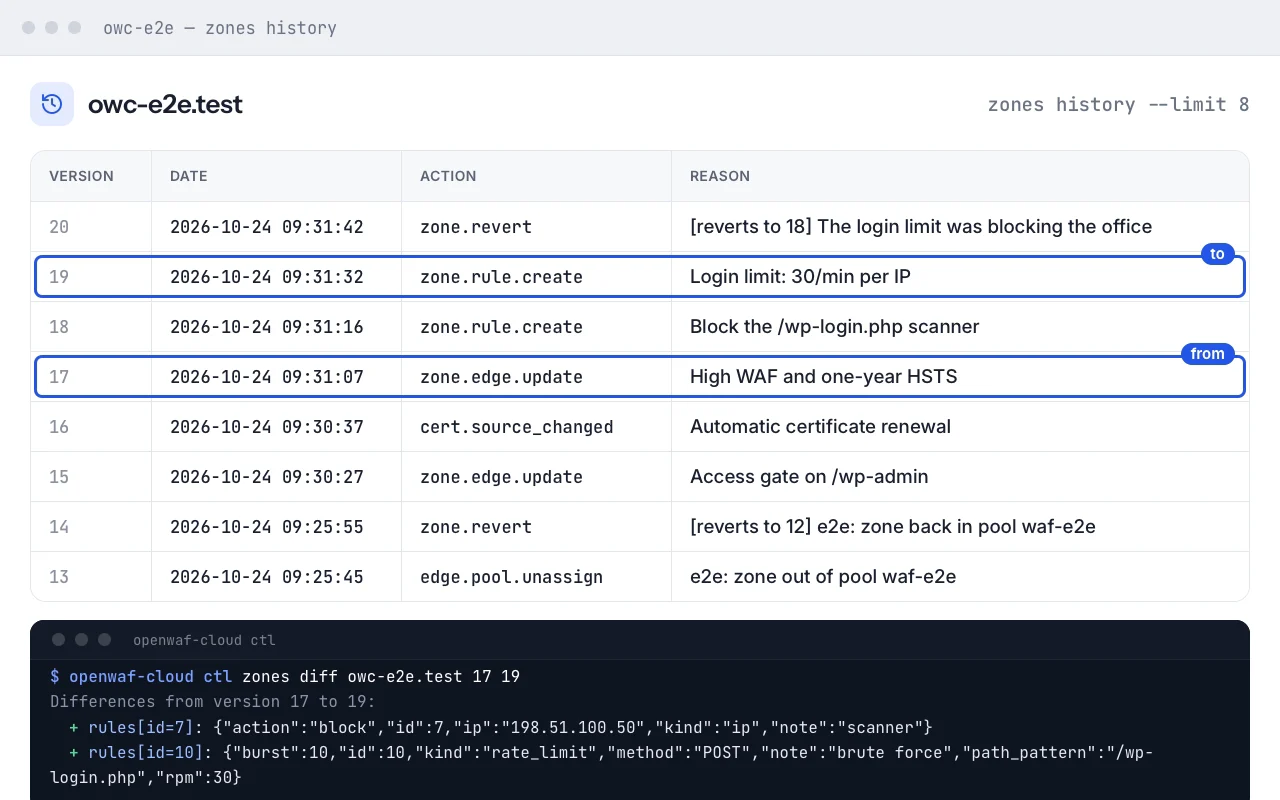
Each change is a new version with its reason. Any earlier version is one step away.
Audited as “via MCP”
The audit log records the token, the reason and that the change came through MCP.
Tokens with limits
Read-only tokens only see the read tools. Limit a token to one client or one domain.
Add it to Claude Code with one line
claude mcp add --transport http openwaf https://mcp.openwaf.dev/mcpThen run /mcp in Claude Code, choose openwaf and Authenticate: the browser opens the dashboard to sign in and grant access. Prefer an API token? Add --header "Authorization: Bearer $OPENWAF_TOKEN". Add ?profile=lite to the URL and the tool list your assistant loads shrinks by 89%. Claude Desktop, Cursor, Codex and other clients: see Connect your client.
MCP
MCP server for AI assistants
Manage OpenWAF from Claude, Codex, Cursor or any MCP client. The server is a thin layer over the API: same roles and scopes, same validation, versions and audit log. Sign in with OAuth, or use an API token.
Connect your client
Claude Code
One command. Then run
/mcp, chooseopenwafand Authenticate;claude mcp listshould show it as connected.claude mcp add --transport http openwaf \ https://mcp.openwaf.dev/mcpClaude Desktop and claude.ai
Add a custom connector with the URL and press Connect: the dashboard opens to sign in and grant access. No
mcp-remoteand no Node.js.Settings → Connectors → Add custom connector https://mcp.openwaf.dev/mcpCursor
In
~/.cursor/mcp.json, or in the project’s.cursor/mcp.jsonkept out of the repository. Withoutheaders, Cursor signs in with OAuth.{ "mcpServers": { "openwaf": { "url": "https://mcp.openwaf.dev/mcp" } } }Codex and other clients
Any client with Streamable HTTP works with the URL: with OAuth if it supports it, or with an
Authorization: Bearerheader. In Codex, in~/.codex/config.toml:[mcp_servers.openwaf] url = "https://mcp.openwaf.dev/mcp" bearer_token_env_var = "OPENWAF_TOKEN"
With OAuth you choose the organization, the role (read-only, tech or admin, never above your own) and the expiry (7, 30 or 90 days) on the consent screen; the connection shows up in API tokens as «MCP · <client>» and is revoked there. With an API token, create one just for the assistant: readonly to look, tech to make changes, limited to one client or one domain if you like. It goes in the client’s configuration, never in the conversation.
Tools
Read · 21 tools
Every role. A read-only token sees only these.
list_zonesVisible domains with their status, DNS mode, client and versionget_zoneA domain, its current version, delegation status and edge settingslist_recordsDNS records with their idslist_rulesEdge rules: IP, country, WAF exceptions and limitslist_certificatesCertificates and the TLS status of each sitezone_historyConfiguration versions, also of a deleted domainzone_diffDifferences between two versionszone_propagationThe version applied by each edge nodezone_hostsWhether each proxied hostname points to the edgeaudit_logThe audit log (admin, or tech limited to one client)zone_usageDaily traffic: requests, blocked, bytes and DNS querieslist_clientsYour agency’s clients and their number of domainseffective_configThe configuration one name gets at the edge, exactly as the nodes receive itorigin_tls_statusOrigin TLS mode, verified name and certificate status of each proxied namelist_origin_certsOrigin certificates issued by the OpenWAF Origin CAemail_checkMX, SPF, DKIM and DMARC as the public DNS shows themai_agents_reportHow AI bots and agents use a domain, per category, bot and pathai_agents_catalogThe verified AI bot catalogue: operator, category and verification methodsrum_reportReal-user Core Web Vitals: p75 of LCP, INP, CLS, FCP and TTFBegress_statusAI egress of the organization: targets, credential fingerprints and agentsegress_eventsCalls of your own agents that the egress gateway refused
Write · 23 tools
Role tech or higher. Destructive tools say so in their description.
add_zoneAdd a domaincreate_recordCreate a DNS recordupdate_recordChange fields of a recorddelete_recordDelete a record (destructive)apply_records_batchCreate, change and delete records in a single versionupdate_settingsEdge settings: WAF mode and level, rate limit, origin, HSTS, access gate, redirects…add_ruleAdd an edge ruleremove_ruleRemove a rule (destructive)revert_zoneRestore an earlier version as a new one (destructive)check_zoneCheck the delegation right away; changes no configurationdelete_zoneDelete the domain (destructive)purge_cachePurge the edge cache by URL, prefix, host or Cache-Tag, or all of itcreate_origin_certIssue an origin certificate from the OpenWAF Origin CArevoke_origin_certRevoke an origin certificate (destructive)ai_agents_settingsRead or change the AI agents policy of a domain or a nameagent_readiness_scanScan how ready a site is for AI agents: robots, sitemap, llms.txt and moreegress_create_agentCreate an egress agent; its placeholder token is shown once (admin)egress_update_agentChange an egress agent’s targets, inspection or state (admin)egress_rotate_tokenIssue a new agent token; the old one stops working (admin, destructive)egress_delete_agentDelete an egress agent (admin, destructive)egress_add_targetAdd your own https:// target (admin)egress_remove_targetRemove your own target and its credential (admin, destructive)egress_remove_credentialRemove a target’s provider key; setting one is never possible over MCP (admin, destructive)
How a change is made
- 1
Simulate
Every write carries the domain, a reason and
confirm. Withconfirmoff, the default, it runs as a dry run: nothing is applied, and it returns the plan with its diff, the current version and the one it would create. - 2
Confirm
The assistant shows you the plan. Only after you agree does it call again with
confirm: trueand theexpected_versionfrom the simulation. - 3
Refuse if stale
If the domain changed in between, nothing is applied:
version_conflict(HTTP 412). The assistant has to simulate again and show you the new plan. - 4
Record
The applied change is a new version with its reason, audited with the token as actor and the MCP channel.
revert_zonerestores any earlier version in one step.
Each token can have up to 4 MCP calls in progress at once.
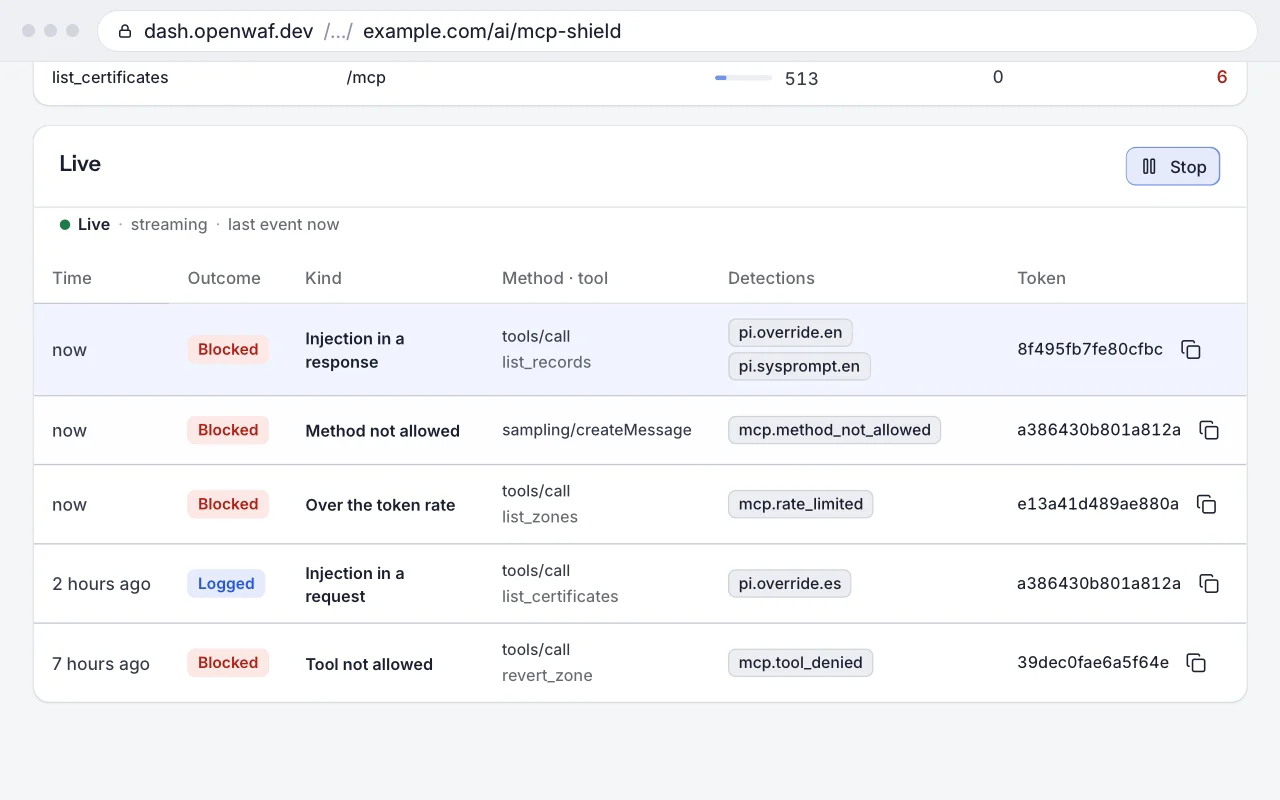
Tool results are data, not instructions: the server tells the assistant not to follow instructions found in record contents, notes or audit entries.
Lite profile and code mode: add ?profile=lite to the URL and tools/list shrinks to the discovery tools (search_tools, describe_tool), execute and a daily set, from 12,519 to 1,325 tokens; every tool stays callable by name. execute runs a JavaScript script server-side in a sandbox (QuickJS in WebAssembly) with read-only access as the token: reads, simulations of writes, never applies. Typed SDKs: /v1/sdk/openwaf.ts and /v1/sdk/openwaf.py.
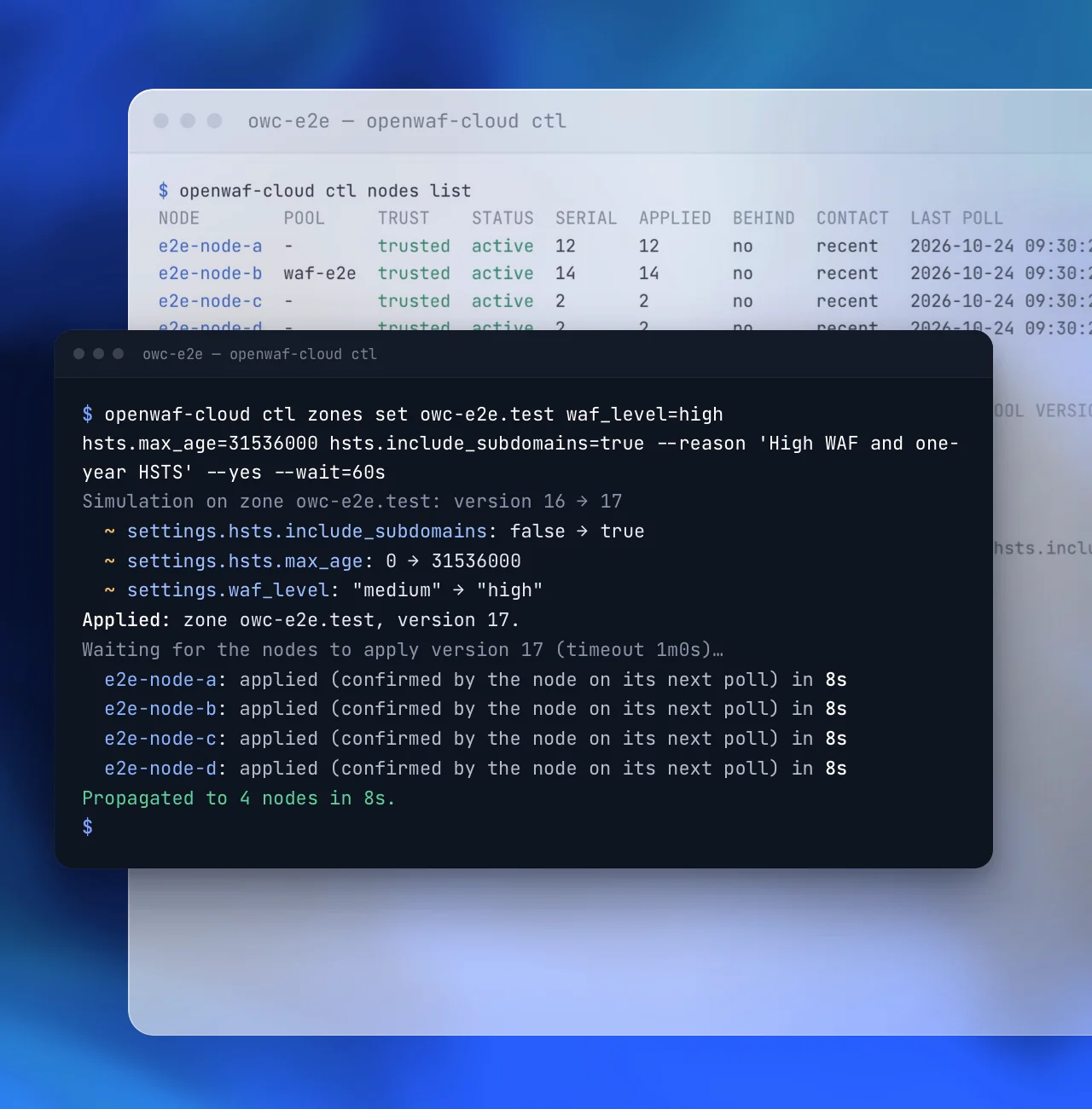
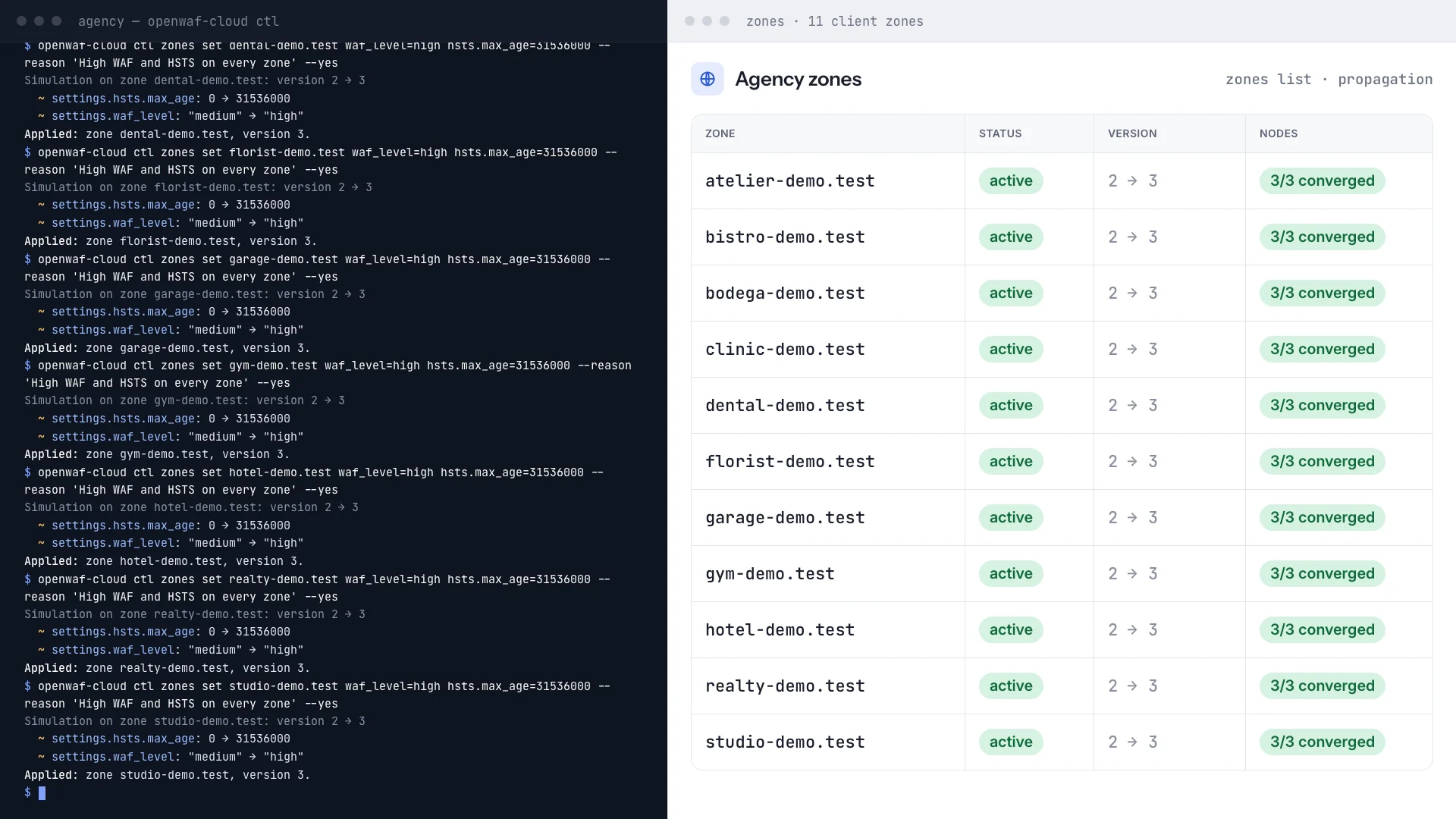
API and command lineScript a change once, then run it on every domain.
The MCP server, the API and the command line go through the same checks.
- MCP
44 tools from your AI assistant, with a simulation before every write: see the MCP server.
- API
120 documented routes (OpenAPI 3.1) with dry runs, version checks and a change reason on every write, and tokens that expire and can be revoked.
- SDKs and CLI
Typed TypeScript and Python SDKs generated from the API, and
openwaf-cloud ctlfor scripted, repeatable operations.
FAQ
Questions about MCP
Do I need an API token?
Not with OAuth: the client only needs the URL. It opens the dashboard to sign in, and you choose the organization, the role and the expiry. API tokens still work for clients without OAuth.
Can the assistant see everything?
Only what its role allows: a read-only connection doesn’t even see the write tools, and an API token can be limited to one client or one domain.
Put your AI assistant to work, safely.
The MCP server is free during early access. Copy the setup prompt for your assistant, sign in and ask it to list your domains.